












Cloudways spent 2026 becoming two products instead of one. Flexible is the classic managed-server panel, Autonomous is the Kubernetes autoscaling tier, and both now sit under DigitalOcean’s roadmap alongside the new NGINX-based Lightning Stack, an AI Copilot and a managed AI-agent product. That is a lot of movement for a platform users left because it stopped moving.
The catch nobody talks about is that none of it changed the two things that push people out the door: you still cannot get root on a Cloudways server, and you still pay a management fee stacked on top of a cloud bill you could have paid directly. A 1 GB DigitalOcean droplet costs about $6/month from DigitalOcean. The same managed 1 GB server is $11/month on Cloudways – reasonable if you want the management, expensive if you were going to manage it anyway.
This guide ranks the best Cloudways Alternatives available in September 2026 on the four numbers that actually decide a switch: what you pay, whether you get root, what the platform meters, and what it costs to move. Every price below was re-checked against the provider’s own pricing page in September 2026.
Quick Summary / TL;DR
Short on time? Here is the whole guide in a few lines:
| If you want to… | Use this | Starting price | Setup time |
|---|---|---|---|
| Cut the bill without losing control | xCloud | $0 self-managed · $5/mo managed | 10–30 min |
| Premium managed WordPress on Google Cloud | Kinsta | $35/mo ($30 annual) | 1–2 hours |
| Enterprise support and agency tooling | WP Engine | $30/mo ($25 annual) | 2–4 hours |
| Speed-first managed hosting with Cloudflare Enterprise | Rocket.net | $30/mo ($25 intro) | 1–2 hours |
| A mature panel for servers you already rent | RunCloud | From $8/mo + your VPS | 30–60 min |
| WordPress-specialist agency tooling | GridPane | Free Core · PeakFreq from $19/mo | 1–2 hours |
| The cheapest panel that still gives root | ServerAvatar | $7.50/mo annual + your VPS | 30–60 min |
Best overall value: xCloud — free tier on a server you already own, $5/month managed, unlimited sites, no visit metering, migrations included at every tier.
Best premium managed host: Kinsta — Google Cloud C2 machines and the best-documented support desk in the category, if the visit meter fits your traffic.
Best for agencies: xCloud or GridPane — white-labelling, team roles and client-facing dashboards, with very different price curves.
What Changed in 2026 (and Why This List Is Different)
If you read a Cloudways comparison written in 2025, roughly half its numbers are now wrong. Here is what actually shifted.
| Change | What it means for you |
|---|---|
| Cloudways split into Flexible and Autonomous | Autonomous is a separate autoscaling WordPress product, not an add-on. Do not compare its entry tier to a Flexible server. |
| Lightning Stack replaced the old stack | Cloudways’ NGINX-based stack is genuinely faster than what it replaced. Performance is no longer the strongest argument for leaving. |
| RunCloud retired its free plan | Essentials is now $8–9/month for a single server, and white-label sits on the $399/month Enterprise tier. |
| GridPane went free at the bottom and managed at the top | Free Core covers 25 sites; PeakFreq sells managed servers from $19/month. The old $50/month entry point is gone. |
| SiteGround’s cloud tier is $100/month | Its $2.99 shared plans renew at $17.99–$44.99. It is no longer the obvious budget pick. |
| WordPress share eased to ~41% | As of September 2026, W3Techs puts WordPress at 40.7% of all websites, down from a 43.6% peak in mid-2025. The market is normalising, not collapsing. |
That last row matters more than it looks. Hosting margins get squeezed when new-site growth cools, which is exactly when panel-plus-your-own-VPS models start winning on price.
Why WordPress Users Are Leaving Cloudways in 2026
Before ranking the best Cloudways Alternatives, it helps to name the three complaints that show up in almost every migration thread.
1. The Markup Is Real, Just Smaller Than People Claim
Cloudways is a management layer priced on top of someone else’s compute. On DigitalOcean, a 1 GB server runs $6/month direct and $11/month managed — call it an 80% premium for the panel, the support desk and the stack. A 2 GB server is $22/month and a 4 GB is $50/month, and the same 1 GB size costs $14 on Vultr or Linode, $20.56 on AWS and $37.33 on Google Cloud.
That is defensible pricing for a managed product. It stops being defensible the moment you realise you were going to configure Redis and Cloudflare yourself anyway.
2. The Sticker Is Not the Bill
Add-ons are where Cloudways invoices drift. Offsite backup storage is $0.033 per GB per server rather than a bundled flat fee, and Cloudflare Enterprise starts at $4.99 per domain per month. Site Manager is $3/app/month, malware protection $4/app/month, Rackspace email $1.50/mailbox/month, and the advanced support add-on lists at $100/month. Five client domains with CDN and mail attached can quietly double a $22 server.
3. Still No Root Access
This is the sharpest dividing line, and it has not moved since the DigitalOcean acquisition in September 2022. No root SSH, no custom NGINX directives beyond what the panel exposes, no OpenLiteSpeed option, and no way to take the environment with you. For a hobby blog that is fine. For an agency standardising a stack across sixty client sites, it is the whole argument.
The Two Categories You’re Actually Choosing Between
Most roundups mix these together and end up comparing a $5 panel fee to a $35 hosting bill. They are not the same purchase.
| Category | Who owns the server | What you pay | Trade-off |
|---|---|---|---|
| Managed hosts | They do | One line on the invoice | No root, metered sites or visits, no portability |
| Control panels | You do | Panel fee plus your VPS bill | Full root, unmetered sites, you pick the provider |
xCloud is the odd one out because it sells both: a free panel for a server you already rent, or a managed plan that bundles the machine. Every other platform on this list picks a side.
How We Ranked the Best Cloudways Alternatives
Six criteria, weighted toward the things that change your monthly invoice rather than the things that look good on a feature grid.
- True cost at equivalent specs — panel fee plus server bill, not the headline number.
- Root access and portability — can you leave without rebuilding?
- Metering — sites, visits, disk and CDN bandwidth counted separately or not at all.
- Migration cost — included, promotional, or a line item.
- WordPress-specific tooling — object caching, staging with push/pull, one-click updates.
- Support and release cadence — how fast the platform actually ships.
All pricing verified against provider pricing pages on 10 September 2026. Prices move; check before you buy.
Master Comparison Table
Here is how the best Cloudways Alternatives stack up side by side.
| Rank | Provider | Category | Starting price | Root access | Best for |
|---|---|---|---|---|---|
| 🥇 1 | xCloud | Panel or managed | $0 self-managed · $5/mo managed | ★★★★★ Full root | Cost-conscious users, agencies, developers |
| 🥈 2 | Kinsta | Managed | $35/mo ($30 annual) | ✗ None | Premium WordPress, high-traffic sites |
| 🥉 3 | WP Engine | Managed | $30/mo ($25 annual) | ✗ None | Enterprise, agency portfolios |
| 4 | Rocket.net | Managed | $30/mo ($25 intro) | ✗ None | Speed-first sites, bundled Cloudflare Enterprise |
| 5 | RunCloud | Panel | From $8/mo + VPS | ★★★★★ Full root | Developers wanting a mature panel |
| 6 | GridPane | Panel + managed | Free Core · PeakFreq from $19/mo | ★★★★★ Full root | WordPress agencies and resellers |
| 7 | ServerAvatar | Panel | $7.50/mo annual + VPS | ★★★★★ Full root | Budget-conscious multi-stack developers |
🥇 1. xCloud — Best for Cost Savings & Full Server Control
xCloud tops most lists of the best Cloudways Alternatives for one structural reason: it is the only platform here that will either manage a server for you or manage a server you already own, without forcing the choice up front.
Connect an Ubuntu box from Vultr, DigitalOcean, Hetzner, AWS, Google Cloud, Linode, Contabo or plain SSH and you pay retail to your provider plus a panel fee. Or take a managed plan and get the machine bundled. The self-managed tiers run Free for 1 server and up to 10 sites, then $5/server/month for 1–5 servers, $4/server/month for 6–10, and $3/server/month at 10+ servers. Independent reviewers at Online Media Masters measured roughly 40% cost savings against Cloudways on matched specs.
Scale is no longer a question mark either. xCloud manages more than 100,000 websites across 10,000+ servers, and holds a 5-star Trustpilot rating from close to 400 reviewers.
Key Features
- Free tier: 1 server and 10 sites at no cost, on infrastructure you already pay for.
- Full root access: real SSH root on any Ubuntu server, which Cloudways does not offer at any tier.
- OpenLiteSpeed or NGINX: pick the web server per deployment rather than accepting one.
- One-click apps: 286 open-source applications with SSL, backups and updates handled.
- Portable backups: full and incremental, downloadable, or pushed to your own S3 bucket.
- White-label and team roles: included on every tier, not gated behind an agency plan.
How to Migrate from Cloudways
- Sign up and connect a provider API key, or launch an xCloud Managed server.
- Create the server, choosing NGINX or OpenLiteSpeed and a data centre near your audience.
- Install the xCloud migration plugin on the Cloudways site and paste your authentication token.
- Verify on the temporary URL, then switch DNS. 👉 Full server migration guide
Pros and Cons
| Pros | Cons |
|---|---|
| ✅ ~40% cheaper than Cloudways at matched specs | ❌ You choose and manage the cloud provider relationship |
| ✅ Genuinely free tier (1 server, 10 sites) | ❌ Newer platform than RunCloud or GridPane |
| ✅ Full root access and a portable environment | ❌ Some users report OpenLiteSpeed deployments needing extra troubleshooting |
| ✅ Unlimited sites, no visit metering | ❌ Support quality has been reported as inconsistent under load |
| ✅ Migrations, white-label and team roles at every tier |
Best for: Developers, agencies and WordPress professionals who want the cost structure of a VPS with the convenience of a managed panel — and who would rather not rebuild their stack the next time pricing changes.
🥈 2. Kinsta — Best for Premium Managed WordPress
Kinsta earned its reputation honestly. Every plan runs on Google Cloud’s C2 compute-optimised machines with Cloudflare Enterprise in front, and the MyKinsta dashboard is still the nicest control panel in managed WordPress.
The trade-off is metering. Kinsta counts three things at once, and the entry plan is generous on none of them: 35,000 visits, 10 GB of disk and 125 GB of CDN bandwidth, then $0.50 per 1,000 visits, $2 per GB of disk and $0.05 per GB of bandwidth. The Starter plan runs $35/month monthly or $30/month on annual billing.
Key Features
- Google Cloud C2 VMs: compute-optimised, not general-purpose shared tenancy.
- Cloudflare Enterprise included: WAF, DDoS mitigation and 300+ edge locations at no extra charge.
- 35 data centre regions: the widest footprint among premium managed hosts.
- Unlimited free migrations: handled by Kinsta engineers, typically inside an hour.
- 24/7 WordPress-specialist support: consistently the best-rated desk in the category.
- Daily backups with 14–30 day retention: retention scales with plan tier.
Pros and Cons
| Pros | Cons |
|---|---|
| ✅ Premium Google Cloud C2 infrastructure | ❌ Three separate meters: visits, disk and CDN bandwidth |
| ✅ Best-in-class support reputation | ❌ No root access, no portability |
| ✅ Cloudflare Enterprise bundled | ❌ $35/mo entry is 3× a comparable Cloudways server |
| ✅ Unlimited free migrations | ❌ No email hosting included |
Best for: Businesses and high-traffic sites that would rather pay a predictable premium than think about servers. See the full xCloud vs Kinsta breakdown if you are weighing the two.
🥉 3. WP Engine — Best for Enterprise & Agency Support
WP Engine has been doing managed WordPress since 2010 and has turned into a full platform: Genesis, headless WordPress via its Headless Platform, Smart Plugin Manager with visual regression testing, and an agency dashboard built for hundreds of client sites.
The Essential Startup plan is $30/month month-to-month and roughly $25/month on annual billing, capped at 25,000 visits, 10 GB storage, 50 GB bandwidth and one site. Beyond your plan, WP Engine bills $2 per 1,000 visits and $20/month for each extra site — the steepest overage rate among the managed hosts here.
Key Features
- EverCache: WP Engine’s own caching layer, tuned for WordPress specifically.
- Dev/Stage/Prod environments: proper three-stage workflows on every plan.
- Smart Plugin Manager: automated plugin updates with visual regression checks.
- Genesis Framework and StudioPress themes: included at no extra cost.
- Global CDN and page performance monitoring: built in rather than bolted on.
- 30–60 day backup retention: the longest default retention in this comparison.
Pros and Cons
| Pros | Cons |
|---|---|
| ✅ Enterprise security and compliance posture | ❌ $2 per 1,000 overage visits compounds fast |
| ✅ Genesis + Smart Plugin Manager included | ❌ No root access |
| ✅ Strong agency programme and partner network | ❌ Bans several common caching plugins |
| ✅ Long backup retention out of the box | ❌ Overkill for a handful of small sites |
Best for: Agencies and enterprises that need compliance paperwork, SLAs and a support desk that answers the phone. Compare directly at xCloud vs WP Engine.
4. Rocket.net — Best Speed-First Managed Host
Rocket.net is the newest name on this list and the one people are most likely to have missed. Every plan ships with Cloudflare Enterprise at the edge, which means the CDN, WAF and DDoS layer are not upsells — they are the product.
The Starter plan is $30/month ($25 intro) for one install, with visitors unmetered and 50 GB of bandwidth, daily backups on 30-day retention, and Object Cache Pro with Relay pre-configured. Unmetered visits is unusual at this price point and worth noting if bot traffic has ever blown up a Kinsta or WP Engine invoice.
Key Features
- Cloudflare Enterprise on every plan: 300+ PoPs, edge caching, enterprise WAF.
- Unmetered visitors: bandwidth and site count are capped, visits are not.
- Object Cache Pro + Relay: pre-configured rather than a paid add-on.
- Unlimited free migrations: handled by the Rocket.net team.
- 30-day backup retention: daily, restorable in one click.
- 24/7 live chat and tickets: on all plans.
Pros and Cons
| Pros | Cons |
|---|---|
| ✅ Fastest edge setup of any host here, by default | ❌ No root access |
| ✅ Visits are not metered | ❌ Sites and bandwidth are capped by plan |
| ✅ Enterprise caching included, not upsold | ❌ Smallest ecosystem of the managed hosts |
| ✅ Free migrations, 30-day money-back | ❌ Little appeal if you want server-level control |
Best for: Content sites and stores where page speed is the KPI and nobody wants to think about a CDN contract. Full comparison at xCloud vs Rocket.net.
5. RunCloud — Best Established Panel for Developers
Among the panel-based best Cloudways Alternatives, RunCloud is the mature one. It has been shipping since 2016, the documentation is excellent, and the Git deployment and atomic-deploy workflows are genuinely good.
Two things changed in 2026. The free plan is gone, and the tiers moved: Essentials is $8–9/month for a single server, Professional $19/month for 50 servers, Business $49/month for 100 servers with team seats, and Enterprise $399/month. White-labelling and log analysis now sit on that top tier only, which is the detail agencies tend to discover late. Remember the panel fee never includes the machine add your VPS bill before comparing to anything managed.
Key Features
- NGINX + Apache hybrid: flexible per-application web server configuration.
- Git deployment with atomic deploys: zero-downtime releases.
- WordPress Canvas: RunCloud’s WordPress-specific site tooling.
- Bulk site, server and cPanel migration: built into the panel.
- One-click Let’s Encrypt SSL: with auto-renewal.
- Full and incremental backups to S3: though not downloadable locally.
Pros and Cons
| Pros | Cons |
|---|---|
| ✅ Mature platform with deep documentation | ❌ Free plan discontinued |
| ✅ Excellent Git and deployment tooling | ❌ White-label locked to the $399/mo tier |
| ✅ Unlimited websites per server | ❌ No OpenLiteSpeed option |
| ✅ Full root, any provider | ❌ Ticket-only support, no live chat published |
Best for: Developers who want a proven panel and do not need white-labelling. If you are shopping the other direction, we also maintain a guide to the best RunCloud alternatives.
6. GridPane — Best for WordPress Agencies & Resellers
GridPane is purpose-built for WordPress agencies and it shows: Fortress security, Object Cache Pro integration, snapshot failover, multi-WAF support and multitenancy are all first-class rather than afterthoughts.
The pricing model changed materially. Free Core now covers up to 25 sites on your own server, and PeakFreq — GridPane’s own managed infrastructure — starts at $19/month, billed per server rather than per site. GridPane positions PeakFreq at roughly 30% below Cloudways for equivalent capacity. Paid panel tiers above Core climb into the $100+/month range, which is where the platform’s serious security features live.
Key Features
- Fortress security suite: layered hardening, Fail2Ban, malware scanning, multiple WAF integrations.
- Object Cache Pro integration: included rather than licensed separately.
- Snapshot failover: restore an entire server state, not just a site.
- Client billing and multitenancy: built for reselling from day one.
- Full and incremental backups: downloadable, plus S3 server backups.
- Bulk site, server and cPanel migration: matches xCloud’s documented cPanel path.
Pros and Cons
| Pros | Cons |
|---|---|
| ✅ Best security tooling of any panel here | ❌ Serious features sit on $100+/mo tiers |
| ✅ Free Core plan covers 25 sites | ❌ Steepest learning curve on this list |
| ✅ PeakFreq bundles servers if you want them | ❌ No live chat on Free Core |
| ✅ Strong, opinionated agency community | ❌ Overkill for a personal site portfolio |
Best for: Established agencies running 20+ client sites who will actually use the security stack. Head-to-head detail at xCloud vs GridPane.
7. ServerAvatar — Best Budget Panel
ServerAvatar is the cheapest way to get root, a real panel and multi-stack support in one place. It handles LAMP, LEMP, OpenLiteSpeed and Node.js, integrates with most cloud providers, and includes white-labelling and team management on every tier — which RunCloud does not.
Pricing runs $12/month on the Newbie tier at renewal for 5 servers, or $7.50/month on annual billing, with servers capped at 5 / 25 / 50 / unlimited by tier and a free Lite plan available. Applications are unlimited; the server count is the ceiling.
Key Features
- Multiple tech stacks: Apache, NGINX, OpenLiteSpeed and Node.js on the same panel.
- White-label client dashboards: included at every paid tier.
- Free Lite plan: enough to evaluate the platform properly.
- Downloadable remote backups: full and incremental.
- Request and log monitoring: more analysis depth than most panels at this price.
- 12+ auto-installers: beyond WordPress.
Pros and Cons
| Pros | Cons |
|---|---|
| ✅ Lowest paid entry point with root access | ❌ Less WordPress-specific optimisation |
| ✅ White-label on every tier | ❌ Interface is functional rather than polished |
| ✅ Multi-stack including Node.js | ❌ Servers capped by tier |
| ✅ Downloadable remote backups | ❌ Tickets and docs only, no live chat |
Best for: Budget-conscious developers running mixed workloads who will trade interface polish for a lower bill. See xCloud vs ServerAvatar for the full grid.
Also Worth a Look
Three more platforms did not make the main seven but fit specific situations well.
| Provider | Starting price | Why it might be your pick |
|---|---|---|
| SpinupWP | $12/mo Essentials · $19/mo Advanced | Beautifully opinionated panel — but migration is $300 per site |
| Levamo (formerly Rapyd Cloud) | $29/mo annual · $35/mo regular | Tuned for high-traffic WooCommerce, though extra sites are $20 each |
SiteGround deserves a mention too, mostly as a warning. Its shared plans still start at $2.99/month, but StartUp renews at $17.99, GrowBig at $29.99 and GoGeek at $44.99, and the cloud tier that actually competes with Cloudways starts at $100/month. It is a fine first host and a poor second one. Detail at xCloud vs SiteGround.
Cost Breakdown: What You’ll Actually Pay
The line item people forget is their own time. A control panel that saves $15/month but costs you two extra hours a month is not saving you anything.
Roughly 2 GB of RAM, monthly, September 2026
| Provider | Panel/plan fee | Server cost | Total | Your time |
|---|---|---|---|---|
| Cloudways (DO) | Bundled | Bundled | $22/mo | Minimal |
| xCloud self-managed | $5/mo | ~$12 (DO) or ~$4 (Hetzner) | $9–17/mo | ~1 hr setup |
| xCloud Managed | Bundled | Bundled | From $5/mo (1 GB) | Minimal |
| RunCloud | $8–9/mo | ~$12 | $20–21/mo | ~1 hr setup |
| ServerAvatar | $7.50–12/mo | ~$12 | $19.50–24/mo | ~1 hr setup |
| GridPane Core + VPS | $0 | ~$12 | ~$12/mo | ~2 hrs setup |
| GridPane PeakFreq | Bundled | Bundled | From $19/mo | Minimal |
| Kinsta | Bundled | Bundled | $35/mo (metered) | Minimal |
| WP Engine | Bundled | Bundled | $30/mo (metered) | Minimal |
Free Tier Comparison
| Provider | Free option |
|---|---|
| xCloud | ✅ 1 server + 10 sites, indefinitely |
| GridPane | ✅ Free Core, up to 25 sites |
| ServerAvatar | ⚠️ Free Lite plan, limited |
| RunCloud | ❌ Discontinued — 7-day trial only |
| Cloudways | ❌ 3-day trial only |
| Kinsta / WP Engine | ❌ Money-back guarantee, no free tier |
Feature Comparison Matrix
This is where the best Cloudways Alternatives separate most clearly.
| Feature | xCloud | Kinsta | WP Engine | Rocket.net | RunCloud | GridPane |
|---|---|---|---|---|---|---|
| Root access | ✅ | ❌ | ❌ | ❌ | ✅ | ✅ |
| Bring your own provider | ✅ | ❌ | ❌ | ❌ | ✅ | ✅ |
| OpenLiteSpeed option | ✅ | ❌ | ❌ | ❌ | ❌ | ❌ |
| Unlimited sites | ✅ | ❌ | ❌ | ❌ | ✅ | ✅ |
| Visit metering | None | 3 meters | $2/1k over | None | None | None |
| Staging with push/pull | ✅ | Clone only | Clone only | ⚠️ | Clone only | ✅ |
| Downloadable backups | ✅ | ❌ | ❌ | ❌ | ❌ | ✅ |
| Free migration | ✅ | ✅ | ✅ | ✅ | ✅ | ✅ |
| White label | ✅ | ❌ | ❌ | ❌ | Enterprise only | ⚠️ |
| Free tier | ✅ | ❌ | ❌ | ❌ | ❌ | ✅ |
Moving to Modern Cloudways Alternatives: How to Migrate From Cloudways
This migration guide focuses on transitioning safely and efficiently to the best alternative to Cloudways available today. Most alternatives of Cloudways now offer automated tools that minimize downtime and complexity.
Pre-Migration Checklist
- Inventory everything. Domains, databases, cron jobs, PHP versions, SSL certificates and any add-ons you are paying for.
- Lower DNS TTL to 300 seconds at least 24 hours before the move.
- Export a full Cloudways backup even though the migration tool will not need it.
- Sort out email first. Cloudways bundles Rackspace at $1.50/mailbox/month. Plan a replacement — Google Workspace, Microsoft 365, or xCloud MailBox — before you cancel anything.
- Schedule for your lowest-traffic window, and keep the Cloudways account live for at least seven days afterwards.
Step 1: Connect Cloud Provider
Sign up at xCloud (free tier available). Add your Vultr, DigitalOcean, or other provider API key, or use xCloud Managed Hosting for fully managed servers.
Step 2: Prepare the Source Server
In your Cloudways dashboard, note the source server’s public IP address and confirm you can reach it over SSH. You will need either the root password or a key pair. If SSH access is restricted by IP on that server, add your new destination server’s IP to the allowlist now rather than discovering the block mid-transfer.
Step 3: Provision the Destination Server
In xCloud, create the destination server and match or exceed your current Cloudways specs, particularly RAM. RAM determines your PHP worker count, and worker count is what actually decides whether your site holds up under load. Set your web server (NGINX or OpenLiteSpeed) and PHP version to match the source before transferring anything.
Step 4: Migrate Sites
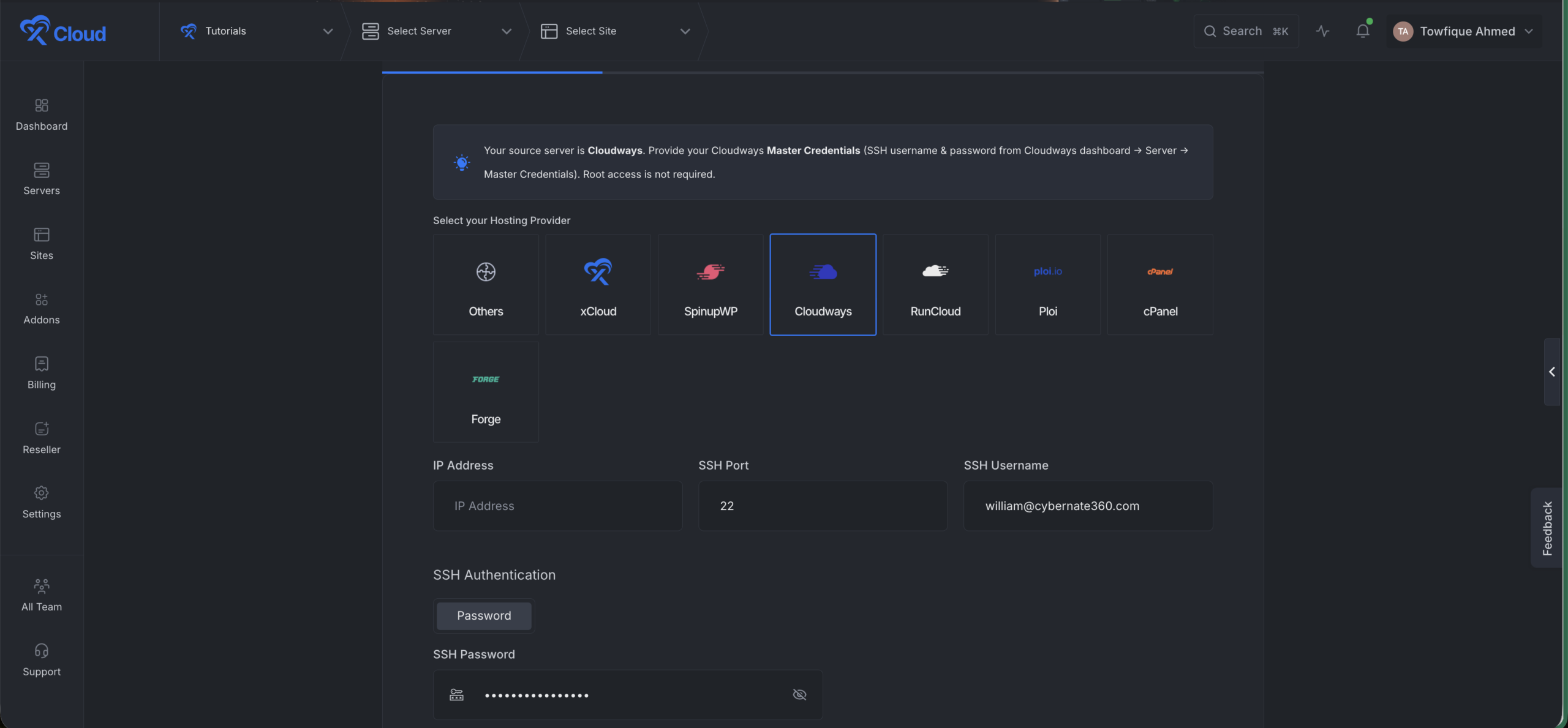
Start a full server migration and enter the source server’s IP address. Set the SSH port and use root as the SSH username. Choose an authentication method, either ‘Password authentication’ or ‘Public key authentication’, and supply the credential.
Step 5: Verify and Go Live
Select the server or specific sites you want to migrate. Click Next to proceed. Choose Create Demo Site for the first pass rather than Go Live, so your production site keeps serving traffic while you test.
Test the demo properly before cutting over: checkout flow, contact forms, cron jobs, scheduled posts, email delivery, and any custom endpoints. Only then point DNS at the new server.
👉 Watch the step by step tutorial video:
You can follow the official documentation to migrate your entire server with all WordPress sites, or refer to the dedicated guide if you only want to migrate a single WordPress site seamlessly.
Common Mistakes When Switching from Cloudways
Downsizing the server to chase the savings. Match your current RAM. The whole point of moving to any of the best Cloudways Alternatives is paying less for the same performance, not less for worse performance.
Comparing panel fees to hosting bills. RunCloud at $8 and xCloud managed at $5 are not the same purchase. One includes a server; the other does not.
Forgetting email. Cloudways’ Rackspace add-on does not travel with you. Sort mail before DNS, not after.
Skipping staging on custom builds. Managed-to-panel moves usually fail in the caching layer, not the database. Test object caching and page caching explicitly.
Cancelling too early. Keep the old account for a week. It costs a few dollars and it is the cheapest insurance in the whole migration.
Which One Should You Choose?
| If you are… | Best choice | Why |
|---|---|---|
| A freelancer with 5–15 sites | xCloud | $5/mo covers all of them on one server, migrations included |
| An agency reselling hosting | xCloud or GridPane | White-label and client billing without a $100/mo floor |
| Running one high-traffic content site | Rocket.net or Kinsta | Edge caching and support you do not have to configure |
| An enterprise with compliance needs | WP Engine | SLAs, certifications and an account manager |
| A developer with existing VPS contracts | RunCloud or ServerAvatar | Panel-only pricing on servers you already pay for |
| Nervous about leaving managed hosting | xCloud Managed | Same hands-off experience, root access if you ever want it |
Move Off Cloudways Without Rebuilding Your Stack
If the reason you are here is the invoice, the arithmetic is simple: take a free xCloud account, connect a server you already pay for, and move one site. Nothing is at risk, nothing is billed, and you will know inside an afternoon whether the performance holds.
What you get on the other side:
- Root access on any Ubuntu server — Vultr, DigitalOcean, Hetzner, AWS, GCP, Linode, Contabo or plain SSH
- Unlimited sites and no visit metering — the server’s resources are the only ceiling
- Site Security PRO and Cloudflare Enterprise — available as addons, not mandatory upsells
- Bulk migration including cPanel — included at every tier, free
- White-label and team roles — from the first paid plan, not the fifth
Start free on a server you already own, or take a managed plan from $5/month – see the pricing.
Conclusion: Your 2026 Cloudways Alternative Roadmap
Cloudways is not a bad product. Lightning Stack made it faster, Autonomous gave it an autoscaling story, and the support desk is still solid. It is just a managed layer with a management price, and in 2026 there are cheaper ways to get the same outcome without giving up root.
The honest read across all of the best Cloudways Alternatives here: managed hosts win when your time is worth more than your hosting bill, and panels win the moment you are running more than three or four sites. Everything else is detail.
Expert Picks by Goal
| Your goal | Best choice | What it costs |
|---|---|---|
| Best overall value | xCloud | $0 self-managed · $5/mo managed |
| Best free tier | xCloud | 1 server + 10 sites |
| Best premium support | Kinsta | $35/mo ($30 annual) |
| Best for enterprise | WP Engine | $30/mo ($25 annual) |
| Best raw speed | Rocket.net | $30/mo ($25 intro) |
| Best for agencies | xCloud or GridPane | $5/mo · Free Core |
What to Do This Week
Pick your lowest-stakes site. Move it to a free xCloud server or a GridPane Core box. Run both hosts side by side for seven days and compare TTFB, not marketing copy. If the numbers hold, move the rest and cancel — in that order. Whichever direction you go, that is the move worth making.
If you have found this blog helpful, feel free to subscribe to our blogs for valuable tutorials, guides, knowledge, and tips on web hosting and server management. You can also join our Facebook community to share insights and engage in discussions.
Frequently Asked Questions
Which of the best Cloudways Alternatives offers the best value for money?
xCloud on the numbers. The free tier covers one server and ten sites indefinitely, paid self-managed plans start at $5/server/month, and independent testing at Online Media Masters measured around 40% savings against Cloudways at matched specs. GridPane’s Free Core is the closest competitor if you only need 25 sites.
Can I get root access with a Cloudways alternative?
Yes, on any control panel. xCloud, RunCloud, GridPane, SpinupWP and ServerAvatar all hand you full root SSH because the server is yours. None of the managed hosts do — Kinsta, WP Engine, Rocket.net and SiteGround own the instance, so the environment stops being portable the day you move to one.
Which alternative is best for WooCommerce stores?
For control and cost, xCloud with OpenLiteSpeed and Redis object caching. For hands-off management under heavy checkout load, Rocket.net’s bundled Object Cache Pro and Relay setup is hard to beat, and Levamo is built specifically for high-traffic stores.
How long does migration from Cloudways take?
Most single sites complete in 10–60 minutes depending on database size. Bulk migrations of 20+ sites usually run overnight. The xCloud migration tooling automates the transfer, and DNS propagation is normally the slowest part.
Do I need technical knowledge to move to a control panel?
Less than you would expect. Provisioning a server on xCloud, RunCloud or GridPane is a form, not a terminal session. The genuine requirement is comfort editing DNS records. If that sentence made you nervous, take a managed plan instead — xCloud Managed is the same hands-off experience with root available if you ever want it.
Is Cloudways still worth using in 2026?
For some people, yes. If you want one invoice, no infrastructure decisions and 24/7 support, Cloudways Flexible at $11/month is a fair deal. If you are running more than a handful of sites, or you want root, or you would rather buy compute at retail, the arithmetic stops working.
What’s the most underrated Cloudways alternative?
Rocket.net, by a distance. Bundling Cloudflare Enterprise on every plan and leaving visits unmetered is a genuinely different pricing philosophy, and it rarely appears on lists of the best Cloudways Alternatives because it is newer and markets less loudly than Kinsta.
Are there hidden costs when switching?
Sometimes. SpinupWP charges $300 per site to migrate. RunCloud puts white-labelling on a $399/month tier. Kinsta meters disk and CDN bandwidth separately from visits. Price twelve months, not one, and include every feature you currently use that becomes an add-on elsewhere.
Can I host unlimited websites on these platforms?
On the panels, yes — xCloud, RunCloud, GridPane and ServerAvatar all treat server resources as the only limit. Managed hosts cap sites by plan: WP Engine charges $20/month per extra site, Kinsta’s Single plans allow one install, and Levamo charges $20 for each additional site.
Where can I get help choosing?
Start with the side-by-side data rather than a listicle. The xCloud comparison hub runs the same format across eleven providers with dated, sourced rows, and xCloud support will talk through a specific portfolio if you want a second opinion.